
Log your day.
Share your weekscope.
Weekscope is a simple work log. Jot down what you work on each day, and it turns your notes into a clear weekly report — what’s done, what’s next and what’s in the way.
Sign in with Google, GitHub or email.
- 01Log a few lines a day
- 02Weekscope drafts your report
- 03Review it and export a PDF
The report, already written
Every section, filled from what you actually did.
Weekscope drafts every section from the statuses you saved during the week. It never invents finished work, blockers or commitments — if it isn’t in your log, it isn’t in your report.
Edit any line, then export a clean PDF to share.
- Name
- Alex Morgan
- Project
- Northwind Portal, Atlas Mobile
- This week — done
- feat/nw-118, NW-118 – Checkout flow redesign
- This week — what slowed me down
- Waiting on API keys from the client team
- Next week — committing to
- ATL-42 – Interactive onboarding animationsAdd the reduced-motion variants, then hand it to QA
How it works
A minute a day. A finished report every week.
- 01
Log as you go
Add a quick entry whenever you finish, start or get stuck on something. A date, a project and a title is enough.
- Paste a ticket screenshot — it’s read on your device
- Several tickets a day, each on its own line
- Autocomplete for projects, ticket IDs and links
- 02
Never lose a day
Workdays with nothing logged turn red, so you catch gaps while you still remember what happened.
- Add work to any past day
- Mark holidays, leave and sick days
- Weekends stay out of the way
- 03
Review at the end of the week
Weekscope assembles the week into your report template. You review, adjust the wording and say what you’ll do next.
- This week’s work, what slowed you down, and next week
- Warnings for missing reasons or names
- Export the whole week or chosen projects as PDF
- 04
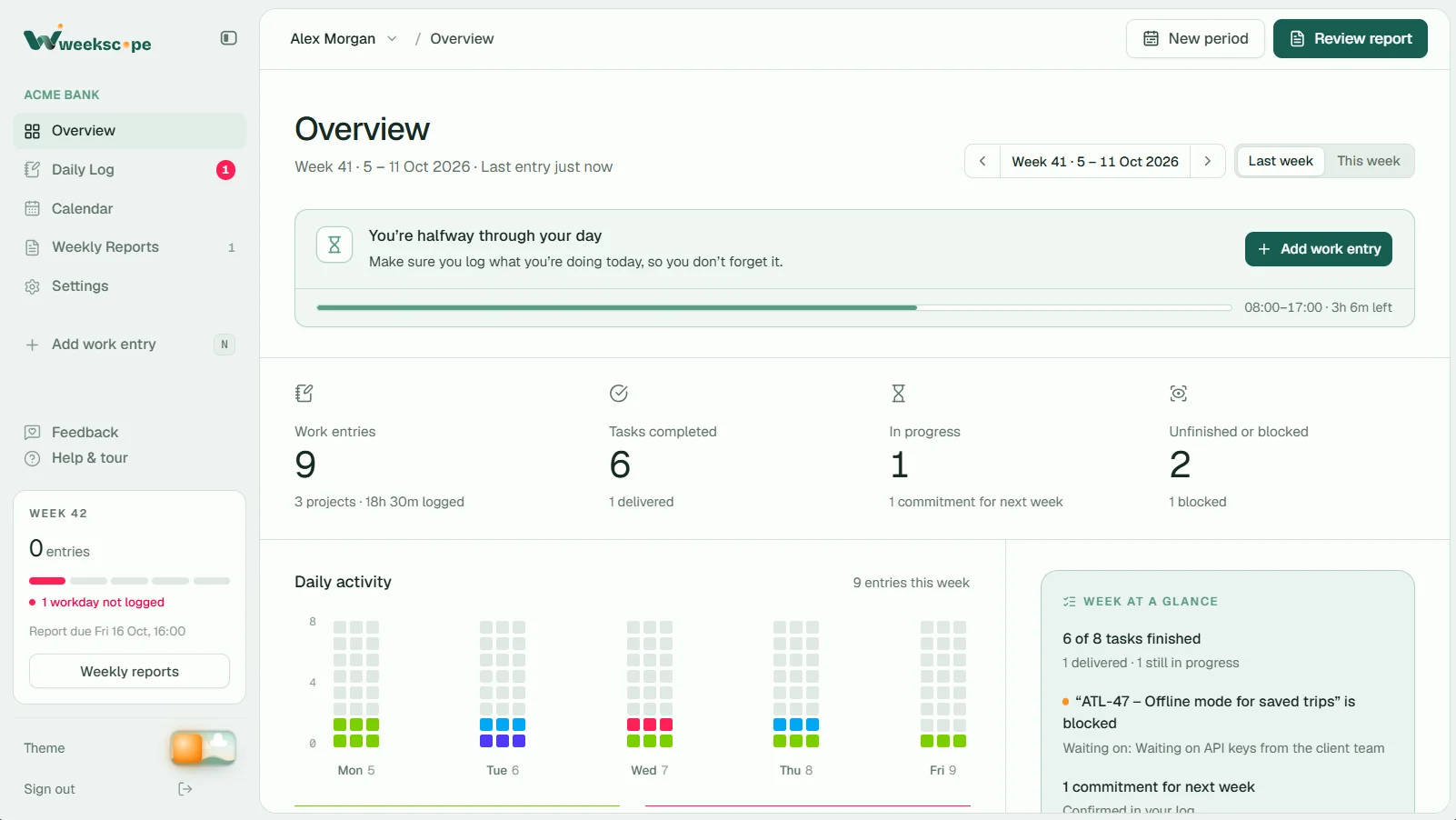
See the week at a glance
One clear picture of what moved, what’s stuck and whether your report is ready — before anyone asks.
- Daily activity and project mix
- Report readiness checklist
- Deadline reminders
The Window
A window to your day.
Today’s card in your Daily Log looks out on the world of Weekscope. The sun follows your clock, and the busier your day, the livelier it gets outside. Clock off, and everyone heads home.
Every day, accounted for
Three months from now, it’s all still there.
Your log and reports are saved to your account. Open the calendar to see the whole year — what you shipped, the days you took off, and any workday you forgot to log.
- Missed workdays flagged in red
- Holidays, leave and sick days
- Click any day to see or add work
Leaderboards
Keep time. Climb the board.
Starting on time, keeping lunch for lunch, logging before the day ends and sending your report by the deadline all earn points. Keep it up and they multiply.
- Your organisation, and everyoneTwo boards: who you’re up against at work, and where you stand among everyone on Weekscope.
- As yourself, or notJoin under your name, a username, or as an Anonymous Otter. Your work is never shown — only points.
- Streaks that multiply×2, ×4, ×6… for as long as you keep to time. A miss starts it again, so every day counts.
- 1Thandi Mokoena38 on time in a row48,920
- 2Anonymous Otter31 on time in a row41,360
- 3Priya Raman27 on time in a row37,785
- 4Lucas Ferreira22 on time in a row30,140
- 5Ayo Adeyemi19 on time in a row26,410
- 12You9 on time in a row14,870
Studying? There’s a Weekscope for that.
Subjects instead of projects. Deadlines and exams that count down, a focus timer, study streaks and a weekly review that’s just for you. Free for students at school, college and uni.
- 1day leftHistory source essayDeadlineHistory · Thu 23 Oct
- 6days leftBiology mock examExamBiology · Tue 28 Oct
- 12days leftCoursework draftDeadlineHistory · Mon 3 Nov
- Biology
- Maths
- English Literature
- History
- Computer Science
- Psychology
- Art & Design
- Chemistry
- Business
- Physics
- Spanish
- Economics
- Media Studies
- Geography
Features
Small touches that save you time.
Reads your screenshots
Drop in a ticket screenshot or a stand-up PDF. Weekscope reads it on your device and fills in the fields — the file is never uploaded.
Many tasks a day
Several projects and tickets in one day? Log each one; the report groups them by project for you.
Autocomplete that remembers
Projects, ticket IDs, names and links fill themselves in from what you’ve logged before.
Export what matters
Download a clean PDF for the whole week, or just the projects someone needs to see.
Days off, handled
Mark leave, public holidays and sick days so they never show up as missing.
Light and dark
Easy on the eyes at 9am and 9pm, with keyboard shortcuts for the things you do every day.
Your data
Records you can trust for the long run.
Sign in with Google, GitHub or email. Your entries, days off and reports are saved to your own account, so they’re there on any device — next week or next year.
Read the privacy policy- Private to youEach account is walled off from every other one — only you can read your entries and reports.
- Backed up as you workChanges save to your account in the background, and the app keeps working if your connection drops.
- Yours to takeExport everything as JSON or PDF whenever you like.
- Files stay on your deviceScreenshots and PDFs are read in your browser and stored only there.
- No ads, no trackingWe don’t sell data or follow you around the web.
- Personal tasks stay personalPlan your laundry and shopping beside your work. Mark a task personal and only you see it: never in a report, never shared with your organisation.
Make reporting the easy part.
Getting started takes a minute. Sign in with Google, GitHub or email and log today’s work.